There are three methods that remap can use to recover the scrambled opcode mappings. The first two of the three
methods perform a chosen plaintext attack against the modified Python bytecode, and the last method walks the opcode.pyc
file’s constants table. These methods are described in greater detail below.
Warning
These methods may not work if other compiler modifications are present in the bytecode, beyond scrambled opcodes.
Method 1: Diff’ing Against the Python Standard Library Bytecode
Note
This method was first described by Rich Smith in pyREtic’s whitepaper, which can be found here. The following
description is a high-level overview.
Any substantial Python application should have a heavy reliance on Python’s standard library. For frozen Python
applications, the Python standard library files typically get included as .pyc files in a zip file. This zip file is
most commonly found in the interpreter binary’s overlay or delivered alongside the application as a standalone file.
For example, the TRITON malware discovered by FireEye in 2017 delivered a Py2Exe interpreter (trilog.exe)
alongside a zip file of compiled .pyc files. Interestingly, this adversary didn’t bother to rename the zipfile from its
default name, library.zip.
Since these Python bytecode files are compiled from a known source, we know what the correct (‘standard’) compilation
should look like. Therefore, when we see compiled Python files that look different than what we would expect, we can
easily spot the differences by diff-ing the modified opcodes against the standard version’s opcodes. Consider the
following simplified example:
print("Hello, World!")
The Python Code object for this segment of code has the following bytecode instructions when compiled with a standard
Python 2.7 interpreter: 640000474864010053. The table below more coherently displays what the bytecode is doing
In reality, there are no print('Hello,World!') statements in Python’s standard library, but there is a whole lot
of other code that can be used to perform this method. remap will attempt to use as much of the standard library as
possible, with the limiting factor being what standard library bytecode is available from the modified interpreter.
This method requires a somewhat significant amount of the Python standard library to be included with your modified
interpreter, and a reference set of compiled Python standard library files.
To get the reference set of Python standard library files, you can use pydecipher’s StandardBytecodeGenerator docker
image. For example, if you need a reference set of Python 2.7.15 standard library .pyc files, you would run:
This method is theoretically identical to the first method, but differs in its application by only using a single,
specially-crafted file to ascertain remapped opcodes instead of the entirety of the Python standard library. Since
“specially-crafted Python file that when compiled uses every opcode for a specific version” is a mouthful, we’ve decided
to use the name ‘megafile’ to refer to these files.
By taking the standard compiled output of a megafile, and comparing it to a custom interpreter’s compiled output, we
can identify how the opcodes change and reconstruct an opmap just from this one comparison.
At first, this may seem like the easiest option. Why reconstruct the opmap using tens (potentially hundreds) of
compiled Python standard library files, when a single file can do? In practice, creating the megafile can be a
tedious and laborious process of editing Python code and recompiling to ensure you’ve covered every possible opcode.
Additionally, once you have the megafile, getting the modified interpreter to execute and compile this file may be
difficult if the interpreter binary employs other obfuscation or anti-analysis techniques.
The first step to applying this opcode-recovery method is learning what version of Python was used by the custom
interpreter you are analyzing. If you run pydecipher with the verbose flag (pydecipher-vcustom_interpreter.exe),
any strings found in the binary that match potential Python versions will be printed out. If you still cannot determine
the version, you will have to manually analyze the interpreter binary.
Once you know the version use, you will have to acquire (or likely, create yourself) a Python file that uses every
single opcode (the ‘megafile’) from this version. Since opcode versions change in Python from version to version, a
megafile will likely only be usable within a single Python minor version. An example of a Python 2.7 megafile is all.py
from the dedrop project. Currently, pydecipher includes dedrop’s all.py with the package, so if you are analyzing
Python 2.7 code, you can simply pass the string 2.7 to remap like so:
$ remap--version2.7-mremapped_megafile.pyc
Pull requests to add more megafile versions are welcome! If pydecipher doesn’t already have a megafile for the version
you are analyzing, you can create your own megafile and pass it in:
To create the remapped_megafile.pyc from your Python source code megafile, you will have to hijack control of the
modified interpreter while it is running in memory and force it to compile your source code. There are a few different
techniques to accomplish this, and your choice of technique will be limited by what OS your interpreter targets and by
any anti-analysis tricks the interpreter employs.
A moderately detailed description of one technique can be found in Ryan Tracey’s report on the PyXie RAT. The
following list of steps is an overview of this method:
Identify the location of the Py_Initialize() function in the custom interpreter. This can be done through
a combination of string analysis and manual comparison of the custom interpreter to a standard interpreter of
the same version (i.e. Python27.dll).
Set a breakpoint to stop execution after Py_Initialize returns, and run the code to this breakpoint. If you
attempt to hijack control of the interpreter before the environment has been initialized properly your
interpreter will probably crash.
Drop your megafile sourcecode (i.e. all.py) in the working directory of the interpreter.
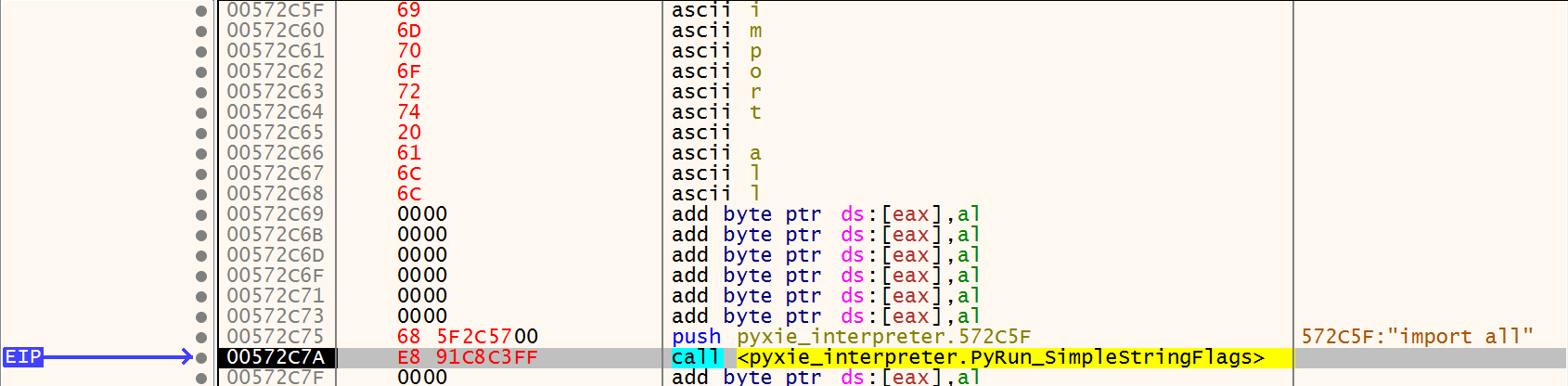
In a code cave, write the string import<name_of_megafile> and note the address in memory. If your megafile
is named all.py, you would write importall.
In a code cave, assemble the instructions push[address_of_import_string], followed by a call[address_of_PyRun_SimpleStringFlags].
Set your EIP to the new push instruction, and have it step through your code cave to execute the
PyRun_SimpleStringFlags function. In your working directory, you should see a new compiled Python file
get created. This will be the custom interpreter’s compiled version of the megafile, that can now be diffed
against the standard compiled megafile.
x32dbg ready to create the compiled megafile for the PyXie RAT
The opcode.pyc constant-walking method will only work if there is parity between the opcode values contained in the
modified interpreter’s Lib/opcode.py file and the values that have been changed in the modified interpreter’s
opcode.h file (in CPython). The creator of the custom interpreter would only need parity between these two opmaps
if their Python code uses the dis module to inspect bytecode produced by the custom interpreter (or another
interpreter with the same opmap). Therefore, it is not always the case that someone who has taken the time to
scramble their CPython interpreter’s opcode values will also change the values in the opcode.py file. It is also
possible that a modified interpreter won’t even include the opcode.py file at all, if the dis module isn’t needed.
With that huge caveat out of the way, we can get into the details of how this opmap recovery technique works.
When a Python source code file is compiled by the interpreter, its code is marshalled into a single code object which
gets appended to a header, and then dumped to a file on disk. During the marshalling of the Code object, any literals
that get encountered get dumped into a tuple attribute of the Code object called co_consts. This includes all
different types of literals - numbers, strings, even more Code objects (which themselves have their own co_consts
attributes!). Furthermore, order matters in the creation of the co_consts list - literals are added to the co_consts
attribute in the order in which they appear in the Code object. Consider the example below.
The co_consts attribute for the above code’s Code object would be:
(None'hello'12'world'3)
We can see that the order in which the string constants and integer literals appear in the source code file exactly
matches their order in the co_consts attribute. The initial None is always included in the co_consts attribute;
this stackoverflow post provides a succint explanation as to why.
Rebuilding the opcode map from opcode.py’s co_consts
If you’ve never seen what the opcode.py file looks like in a standard CPython interpreter, I suggest you take a look
before reading further.
The high-level purpose of the opcode.py file is to assist with the analysis of Python bytecode. The dis module is
one example of the type of bytecode analysis that can be done using the opcode module. The primary function that the
opcode module performs is the recreation of the opname to opcode mapping, known as the opmap. During the creation of
the opmap, the operation names and operation code values are passed into a registering function called def_op.
As discussed in the primer above, when a module gets compiled, the module’s literals get marshalled into the Code
object’s co_consts attribute in the order they appear in the file. For almost all of the opname and opcode literals,
the first and only time these values are seen is in these def_op calls. Knowing this, we can exploit the ordering of
constants in the co_consts attribute to rebuild the opmap. For example, the standard opcode.py’s Code object’s co_consts
attribute has the following segment:
The segment of opcode.py’s co_consts attribute that corresponds to the code in the above block
Since the order of these constants is exactly representative of their opname to opcode mapping as created by the
def_op calls, it is trivial to recreate the opmap. There are a few exceptions which are handled on a case-by-case
basis in remap’s code.
This method is quite simple to use. First, you will need to locate the opcode.pyc file for the custom interpreter.
If you are analyzing a PyInstaller binary, this will be contained within the ZlibArchive. If you are analyzing a
Py2Exe binary, this will be in the zipfile included alongside (or within the overlay) of the binary. pydecipher should
be able to dump and extract these artifacts automatically. Once you have the located thd compiled opcode.py file for
the interpreter, run:
The output of remap is a directory with two files. The directory is named remap_output_*, where the * is substituted
for a pydecipher.utils.slugify()-ed version of the input artifact’s name. The first file in this directory is a
verbose log of remap’s execution. The second is a JSON file, typically named remapping.txt, of the following
format:
If a remapping.txt file already exists in the output directory, then the file will have a monotonically increasing
integer appended to it (remapping-1.txt, remapping-2.txt, etc.). The bracketed values in the above code block are better
described here:
This is one of standard_bytecode_diff, megafile_diff, opcode_pyc_constants, if this file was
produced by remap. It can also be something else entirely, if the opmap was created by a multitude
of methods, by hand, etc. It is not parsed by pydecipher, and only servers as a reference to future
analysts using this file
command_line:
The command line, if any, that produced this file. Reference only; not parsed by pydecipher.
original_opcode_value:
The opcode for this bytecode operation according to an unmodified Python interpreter
(of the version specified by version_str).
operation_name:
The operation name corresponding to the original opcode.
new_opcode_value:
The new, remapped value for this operation.
guess:
remap will only produce complete opmaps with 1:1 pairings of opnames and opcodes, so if we can’t figure out
the remapped value of an opcode using one of the methods above, we must guess. If this value is True, that
means this pairing is a guess. This is not parsed by pydecipher.
pydecipher will only accept a remapping file that has a complete set of opcodes for the specified version. Run remap
with the --check-remapping flag to determine if a opcode map is valid and supported by pydecipher.
Parse remap’s arguments and accordingly set run-time options.
Usually these arguments will come from the command line, however if
remap is being called from code, args may be passed in as a list.
Parameters:
_args (List, optional) – A list of arguments/flags. If you are calling remap from code,
you need to pass in your command line as a space-delimited list.
i.e. for remap--megafile2.7all.pyx, args would be
[’–megafile’, ‘2.7’, ‘all.pyx’].
Returns:
The populated namespace of options for remap’s runtime.
Fill the opmap with any missing opcodes for a specific version.
Since pydecipher can only take in a valid opmap, we must make sure remap
dumps opmaps that contain complete sets of opcodes. Very rarely will an
opcode remapping method be able to cover 100% of opcodes in use for a
particular Python version, so we need to fill the gaps with some guesses.
Parameters:
remappings (Dict[int, int]) – A dictionary of original opcode to remapped opcode.
Remove conflicting remappings from the remappings dictionary.
For example, say part of the remappings dict is
{1:{5:477927:1},....24:{27:204},...}
It is way more likely that 24 was remapped to 27 rather than 1 being
remapped to 27. The single instance that 27 was seen in place of 1 was likely
just noise, compared to the 204 times 27 was seen replacing 24.
This function removes those duplicates and ensures the dictionary returned
has one-to-one relationships.
Parameters:
remappings (Dict[int, Dict[int, int]]) – A dictionary of original_opcode to
Dict[replacement_opcode:replacement_count]. replacement_opcode is
an opcode that was seen in place of original_opcode, and the
replacement_count is the amount of times it was seen replacing the
original_opcode throughout all the bytecode that was analyzed.
Returns:
A dictionary of original_opcode to replacement_opcode, with no
duplicates or conflicts.
Return type:
Dict[int, int]
Raises:
RuntimeError – An opcode not in the known valid range of opcodes was found in this opmap.
Calculate the remapped opcodes and version of a megafile.
This takes in the standard-compiled version of the megafile, as well as
the custom-interpreter version. It returns the Python version and the
dictionary of opcodes to possible remapped opcodes.
Parameters:
reference_megafile (pathlib.Path) – The standard-compiled version of the megafile.
remapped_bytecode_path (pathlib.Path) – The custom-interpreter version of the megafile.
Returns:
A tuple containing a dictionary of original_opcode to
Dict[replacement_opcode:replacement_count] and the opmap’s Python
version. replacement_opcode is an opcode that was seen in place of
original_opcode, and the replacement_count is the amount of times it was
seen replacing the original_opcode throughout all the bytecode that was
analyzed.
Parse code object constants to try and recreate opcode mappings.
This method walks the constants attribute of the opcode.pyc code object.
See the remap documentation for more information on this method.
Parameters:
opcode_file (pathlib.Path) – The path on disk to the opcode.pyc file.
provided_version (str, optional) – The version of Python that this opcode file corresponds to.
Returns:
A tuple containing a dictionary of original_opcode to
Dict[replacement_opcode:replacement_count] and the opmap’s Python
version. replacement_opcode is an opcode that was seen in place of
original_opcode, and the replacement_count is the amount of times it was
seen replacing the original_opcode throughout all the bytecode that was
analyzed.
Diff compiled code objects from standard library and modified interpreter to try and recreate opcode mappings.
This method is similar to the megafile method, but at a larger scale.
See the remap documentation for more information on this method.
Parameters:
standard_bytecode_path (pathlib.Path) – The path on disk to the reference set of standard-compiled bytecode. The version of Python for the reference set
must correspond to the version of Python used as a base for the modified interpreter.
remapped_bytecode_path (pathlib.Path) – The path on disk to the set of bytecode compiled by the modified interpreter
version (str, optional) – The version of Python that this opcode file corresponds to.
Returns:
A tuple containing a dictionary of original_opcode to
Dict[replacement_opcode:replacement_count] and the opmap’s Python
version. replacement_opcode is an opcode that was seen in place of
original_opcode, and the replacement_count is the amount of times it was
seen replacing the original_opcode throughout all the bytecode that was
analyzed.
Write the remappings dict to a JSON file that can be used by pydecipher.
It is assumed that by this point remappings is a bijection of original
opcodes and replacement opcodes.
Parameters:
remappings (Dict[int, (int, bool)]) – A dictionary of original_opcode to (replacement_opcode, guess).
replacement_opcode is the remapped value of original_opcode, and the
guess boolean is whether or not remap actually observed this remapping
or had to ‘guess’ it in order to produce a complete set of opcodes.